Booking deposits: when to ask for one and how they work in Meety

A deposit or full upfront payment makes sense for longer services and scheduled Pilates classes where you hold a place for a client. In Meety, you can set a fixed deposit, a percentage of the price or full payment at booking. You can also use the deposit as a late-cancellation fee under your configured cancellation policy.
Set the rules once. Meety then calculates the amount at booking, guides the client through online payment and shows its status against the appointment. You do not have to send each client your bank details and search for their payment on a statement.
When to ask for a booking deposit
For a short haircut with regular clients who reliably return, automatic reminders may be enough. A colour appointment lasting several hours or a couples massage reserves a larger part of the working day, sometimes for several colleagues.
A deposit connects that booking with part of the price paid in advance. You do not have to introduce it for every service. In Meety, payment settings apply to individual services, so a short haircut can stay pay-on-arrival while a longer colour appointment requires a deposit.
At a massage salon, this might be an appointment that needs two therapists and a shared room. At a hair salon, it might be a service for which a stylist sets aside the whole morning.
Pilates and group classes with payment per place
For reformer Pilates, the number of machines matters too. If you have six, the class has six places. When a client does not attend, one stays empty even though someone else might have wanted it.
In Meety, you can set a group class capacity and require a deposit or full payment in advance. The client chooses a class from the timetable and pays during booking. Meety tracks reserved places and stops accepting bookings once the class is full.
If you allow several places in one booking, a client can reserve a place for someone else too. The price and deposit are calculated from the number of places booked, and that number is deducted from the class capacity.
You can set up a timetable of recurring classes. With automatic cancellation enabled, Meety cancels a class that has not reached its minimum attendance by the configured deadline and refunds the payments received. You do not have to cancel each underfilled class and refund its payments separately.
Meety combines individual appointments, group classes and payments in one system. A Pilates studio can manage private training and its group timetable in the same calendar. See the group lessons guide for details.
A fixed deposit or a percentage of the price
A fixed deposit is the same amount for each booking of a particular service. A percentage deposit is calculated from its price. Full upfront payment means the client pays the whole price when booking.
Here are the three options for a service costing €80.
| Setting | Paid at booking | Balance at the appointment |
|---|---|---|
| Fixed deposit of €20 | €20 | €60 |
| 30% deposit | €24 | €56 |
| Full upfront payment | €80 | €0 |
A fixed amount is easy to explain to clients. A percentage works when you want the deposit to reflect the service price. Full upfront payment can suit a service with a clear final price.
Choose around your services. The same rule may not suit a short treatment and a long colour appointment.
How to set up a deposit in Meety
Online payments are available on the Solo and Premium plans and are processed by Stripe. Connect your Stripe account in payment settings. Then enable required payment for the service and choose a deposit or the full amount.
For a deposit, enter a fixed amount or a percentage. Meety calculates it automatically during booking. If a client books several services that require deposits, those deposits are added together.
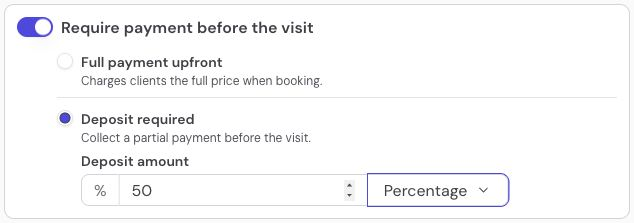
Demo settings: a 50% deposit for a Pilates class. You can choose full upfront payment in the same panel.
The payment stays linked to the appointment. In the calendar, you can see whether the client has paid or the payment is pending or has failed.
See the online payments guide for the full setup.
Show clients what they pay now and what remains
A deposit is easier to understand when the client knows the total price and what they are paying now. For an €80 service with a €20 deposit, you could use this wording:
Pay a €20 deposit when booking your colour appointment. This is part of the €80 service price. Pay the remaining €60 at your appointment.
Payment also comes with rules for changing or cancelling the appointment. During booking, Meety shows clients a short summary of your configured cancellation policy. You do not have to explain it in a separate message after every booking.
Connect the deposit to your free-cancellation deadline
You set the payment amount and cancellation rules separately. Choose how long before the appointment a client can cancel for free and what happens to the payment after that deadline.
With a 24-hour free-cancellation deadline, a Wednesday appointment at 14:00 can be cancelled for free until Tuesday at 14:00. You can send a reminder before that deadline to give the client time to respond.
In Meety, you can also set the deposit to cover a late-cancellation fee. If the client cancels after the configured free-cancellation deadline, the deposit is kept under that rule to cover the fee. You do not have to collect it afterwards. The client sees this condition in the cancellation summary when booking.

The option to use the deposit as a late-cancellation or no-show fee is enabled. Demo settings.
You can enable automatic payment refunds for cancellations within the free-cancellation period. You do not have to refund each of these payments by hand. Set the rules for late cancellations to match your policy.
Reminders and deposits work together: clients know when to arrive, when they can cancel and what happens to their payment. For more options, read How to reduce appointment no-shows.
When you need to issue a refund
You can also refund all or part of a payment directly from the appointment details in Meety. Choose the amount and refund it through your connected Stripe account. The appointment keeps a record of the full or partial refund.
Stripe charges payment-processing fees. Meety does not add another payment-processing fee. See Meety pricing for current plan details.
Booking deposit FAQs
Can I require full upfront payment instead of a deposit?
Yes. In Meety, you can require full payment at booking for a service. This can suit a group class with a fixed price per place. The client pays when booking and, if the price stays the same, has no balance to pay at the appointment.
Can I take upfront payments for Pilates and group classes?
Yes. Meety lets you set a group class capacity and collect a deposit or the full price in advance. If you allow several places in one booking, the price and deposit are calculated from the number of places. You can manage individual training and a group timetable in the same system.
Do I have to collect a deposit for every service?
No. In Meety, you configure payment for individual services. You can combine services with deposits, full upfront payment and payment on arrival.
Is a deposit an extra fee?
No. A deposit is part of the service price paid in advance. If the service costs €80 and the client has paid a €20 deposit, the remaining balance is €60 if the price stays the same.
Can a deposit cover a late-cancellation fee?
Yes. In Meety, you can enable the option to use the deposit as a late-cancellation fee. If a client cancels after the configured free-cancellation deadline, the deposit is kept under that rule. Meety shows the client this condition during booking.
Can I refund a deposit without logging into Stripe?
Yes. You can refund all or part of a payment from the appointment details in Meety. If automatic refunds within the free-cancellation period are enabled, Meety handles the refund for those cancellations automatically.
Require payment where it helps most
Start with services that reserve the most time or team capacity. In Meety, connect the payment to the appointment and set reminders and cancellation rules. Future bookings then follow those settings.